

Catch Weak Content Before It Goes Live with ProWorks Umbraco.AI Page Evaluator
In this day and age, its more important than ever to keep your website content clear, consistent, and on brand. AI infers what your organization does from what it reads on your website and, yes, it reads ALL of your content. Couple this with the rise of AI tools used to outline, write, and enhance marketing content, the risk of publishing AI slop (or even inaccurate information) is high. This is where the ProWorks Umbraco.AI Page Evaluator shines.
What Is AI-Powered Page Evaluation?
AI-powered page evaluation uses a large language model (LLM) to analyze your page content and return structured feedback on key page indicators.
- A landing page can be evaluated and scored for clarity, messaging strength, objection handling, message hierarchy, and the call to action.
- A standard content page can be evaluated on SEO performance, AEO/GEO performance, and accessibility compliance.
- All pages can be evaluated based on brand guidelines, brand voice, and how it supports the organization's marketing strategy.
What is ProWorks Umbraco.AI Page Evaluator (AI Page Evaluator)?
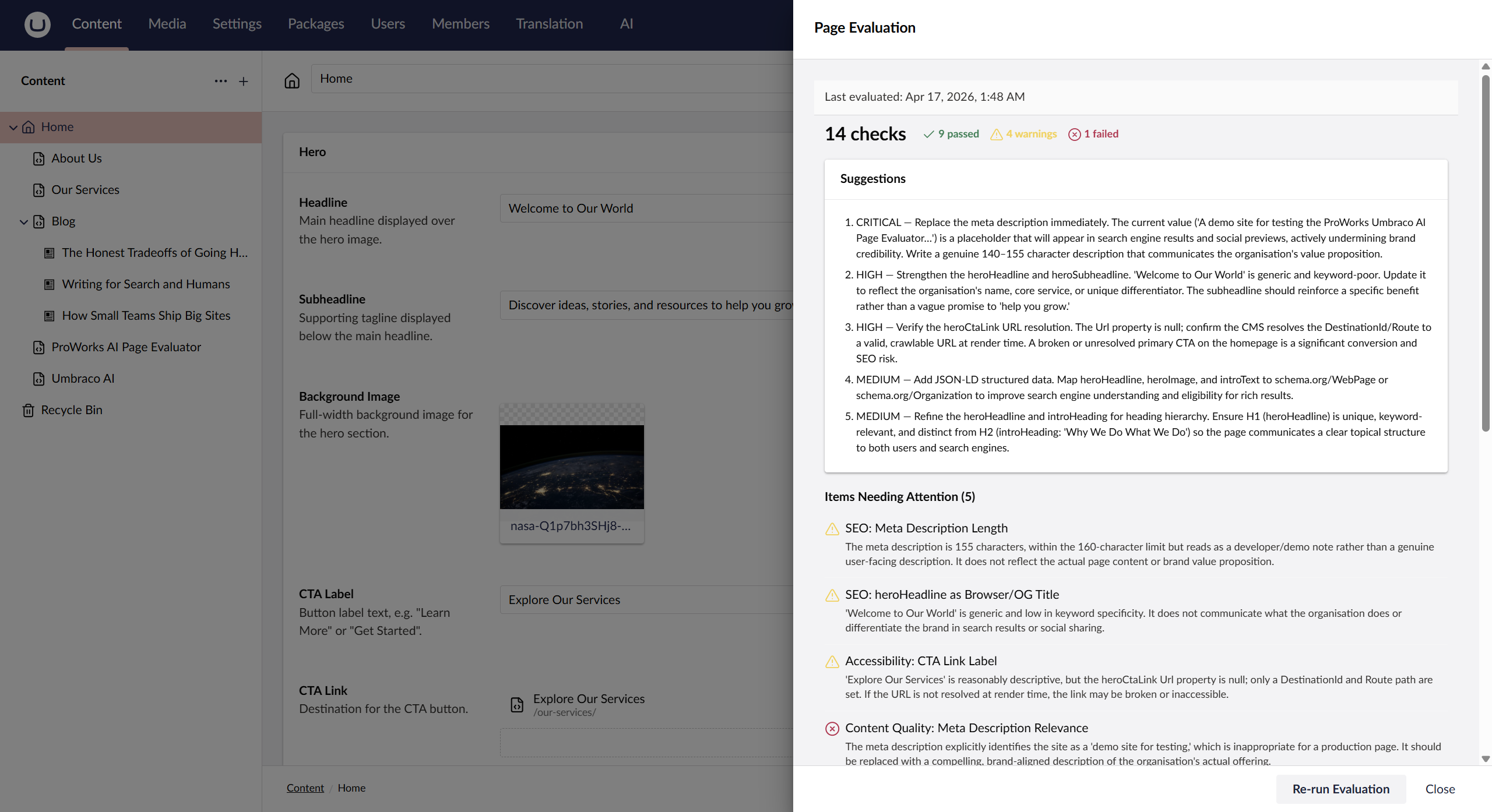
Our AI Page Evaluator is an open-source add-on to the Umbraco.AI framework, which adds a back-office Evaluate Page button you can simply click on to send the page's content to an AI model and return a structured quality report directly inside the back-office, including scored checks, warnings, and actionable suggestions.
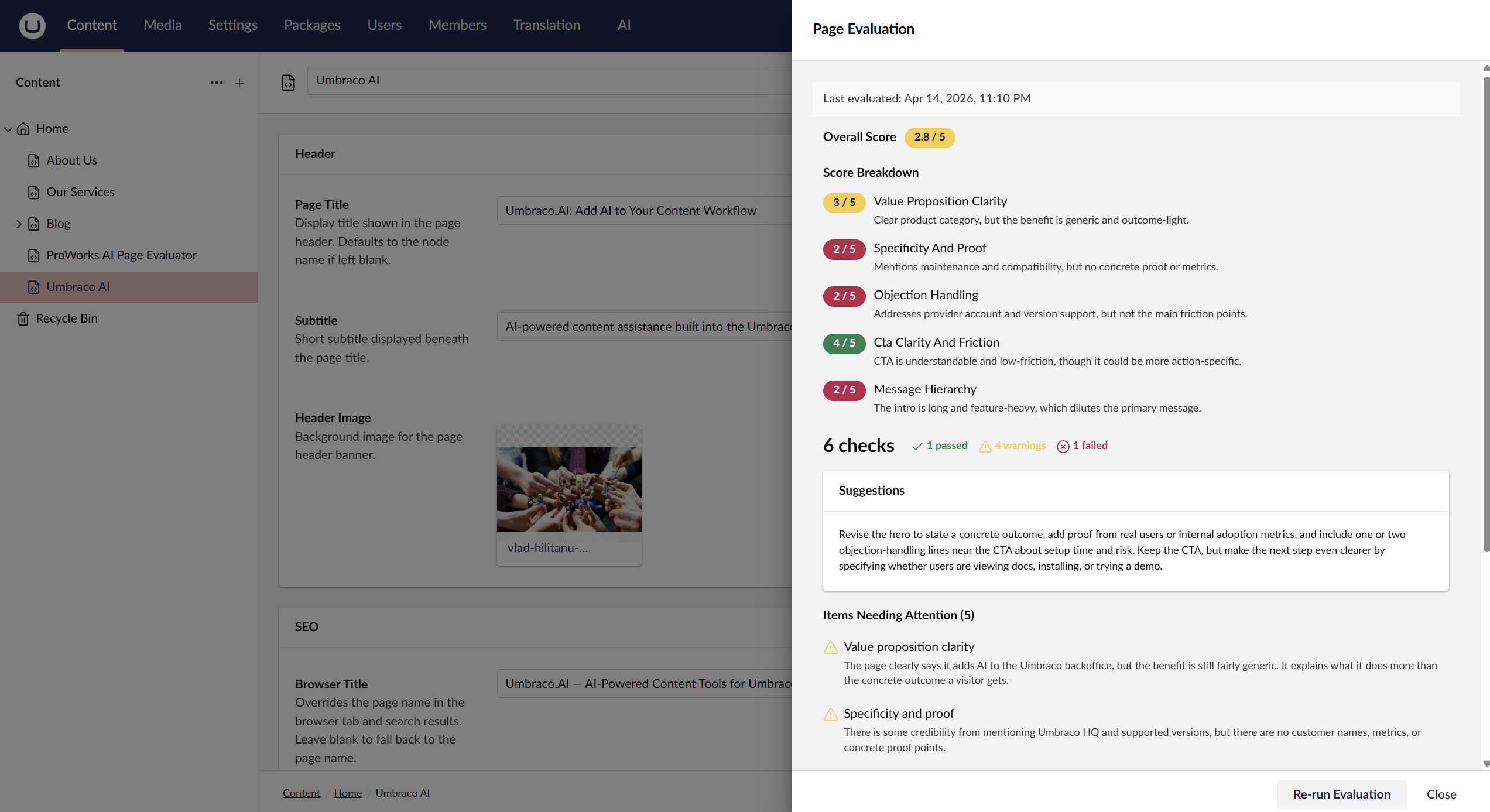
This AI Page Evaluator started because we had a need to evaluate our own Landing Pages and Blog Posts on a rubric to verify content was clear, structured well, and communicated our intent. We had been doing this QA outside of Umbraco and preferred something that lived inside the editorial workflow and was frictionless for content editors to use.
ProWorks Umbraco.AI Page Evaluator works with Umbraco 17.x in combination with the Umbraco.AI official package.
How To Get Started
The install is super-fast, and if you already use Umbraco.AI on Umbraco 17, configuration is fast as well.
Requirements:
- Umbraco 17.3+
- Umbraco.AI
- .Net 10+
Installation
Use NuGet to install AI Page Evaluator for your Umbraco project.
> dotnet add package ProWorks.Umbraco.AI.PageEvaluator
Or search for ProWorks.Umbraco.AI.PageEvaluator in the NuGet Package Manager in Visual Studio.
Package page: https://www.nuget.org/packages/ProWorks.Umbraco.AI.PageEvaluator
Then build the project, run the website, and login to the back-office.
Configuration
In the back-office, go to the "AI" section. Verify you have a Connection to an AI API and a Profile created that uses the Connection that you want to use.
Now go to the Page Evaluator area under Add-ons. Click the "Create New" button and follow the steps below: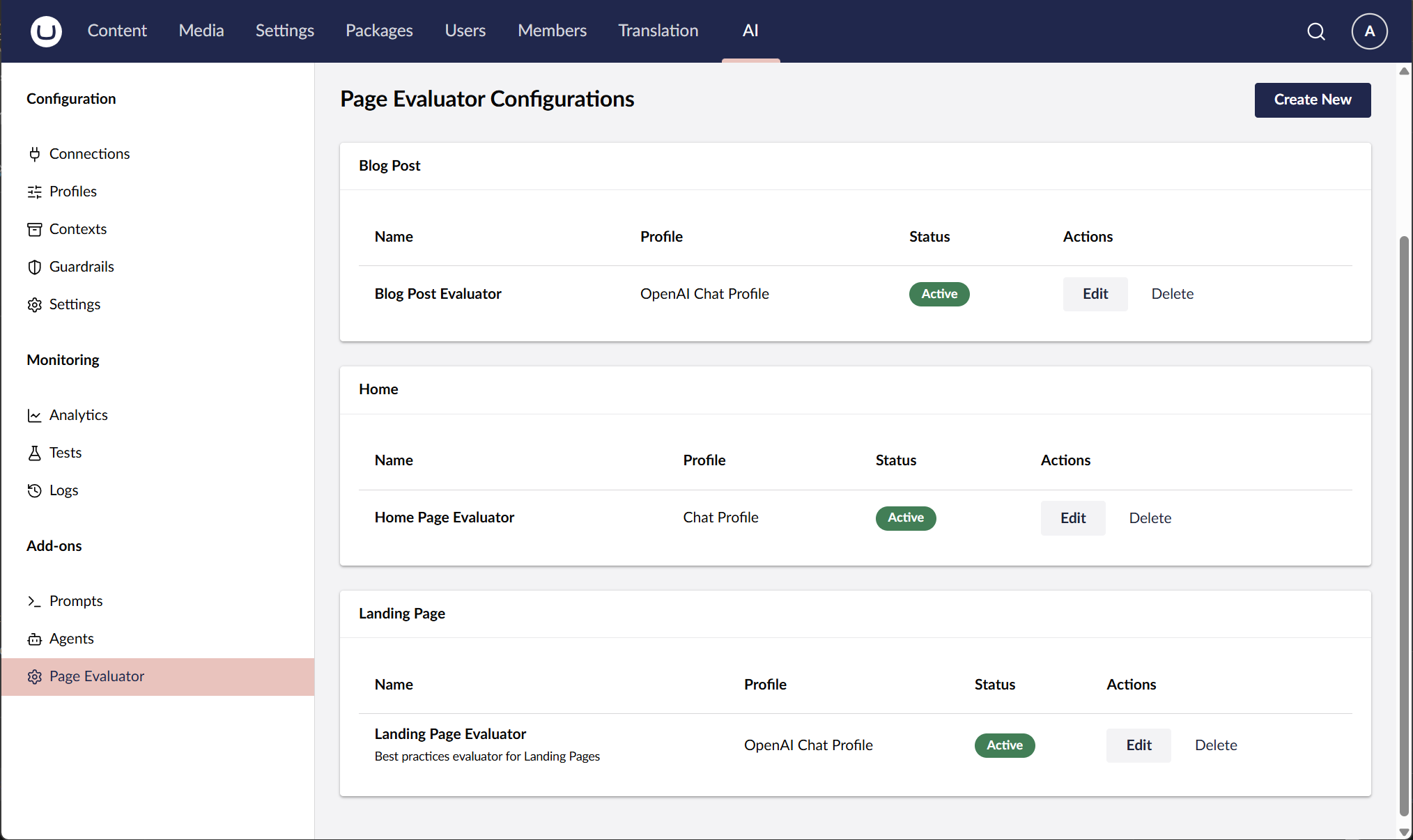
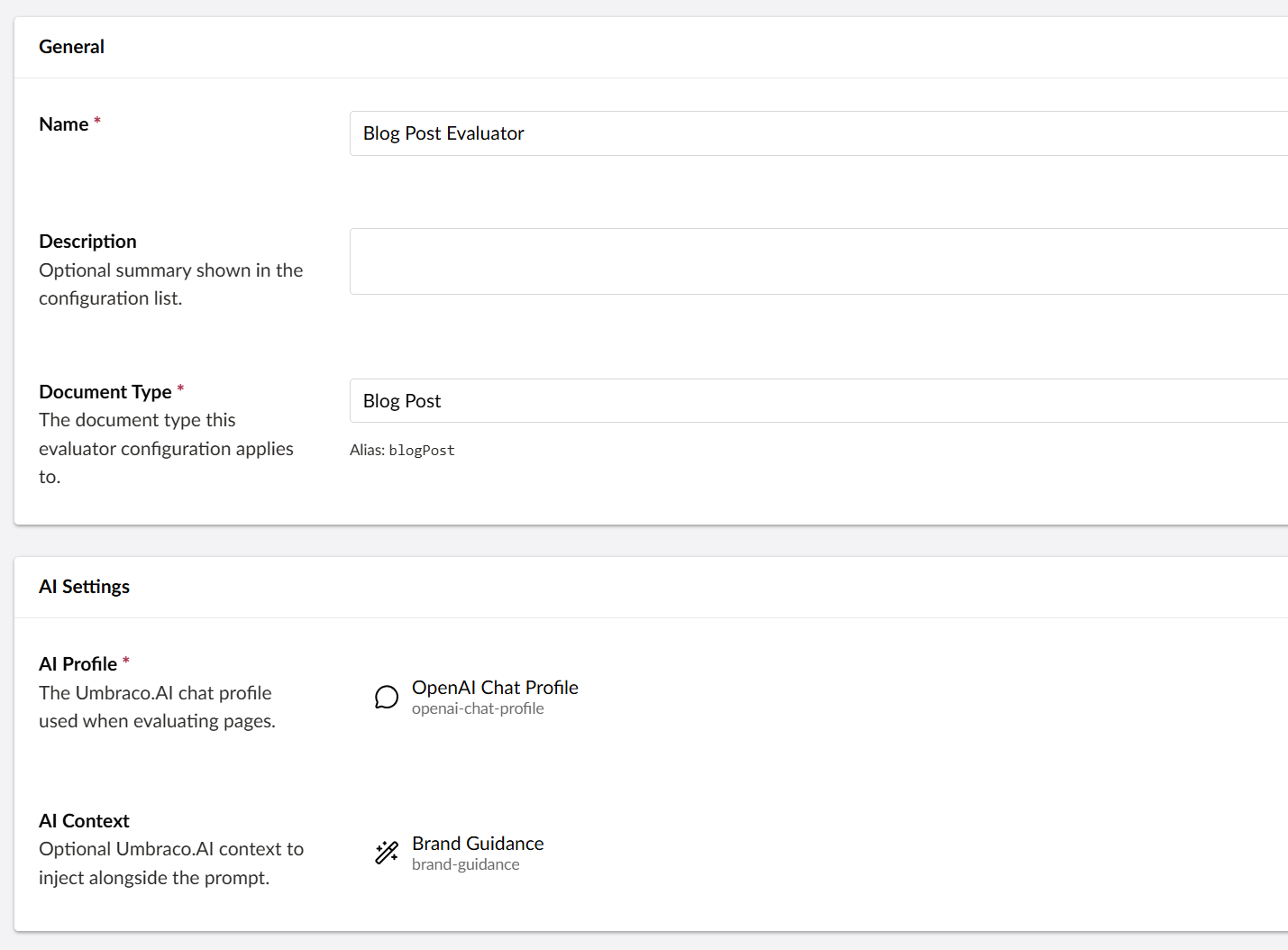
- Fill in the Name and Description
- Select a Document Type to apply the Page Evaluator to. Simply start typing a DocType name and choose the item from the list.
- Select the AI Profile to use for this Page Evaluator. Select the AI Context if desired.
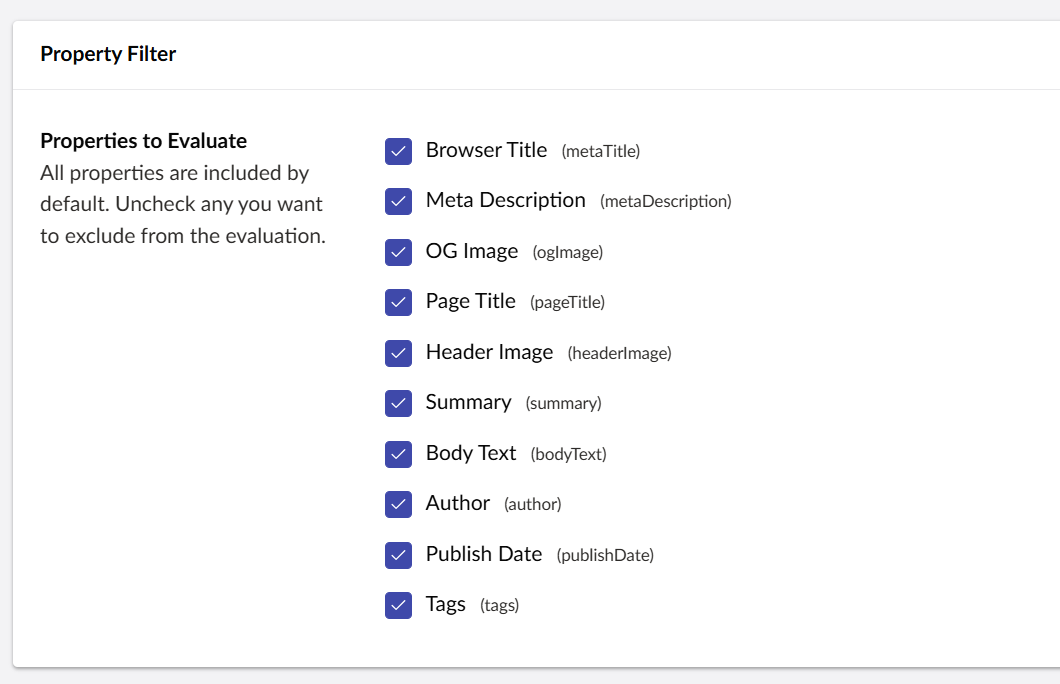
- Review the Properties to Evaluate and remove any properties that aren't important for the type of Page Evaluation you are setting up.
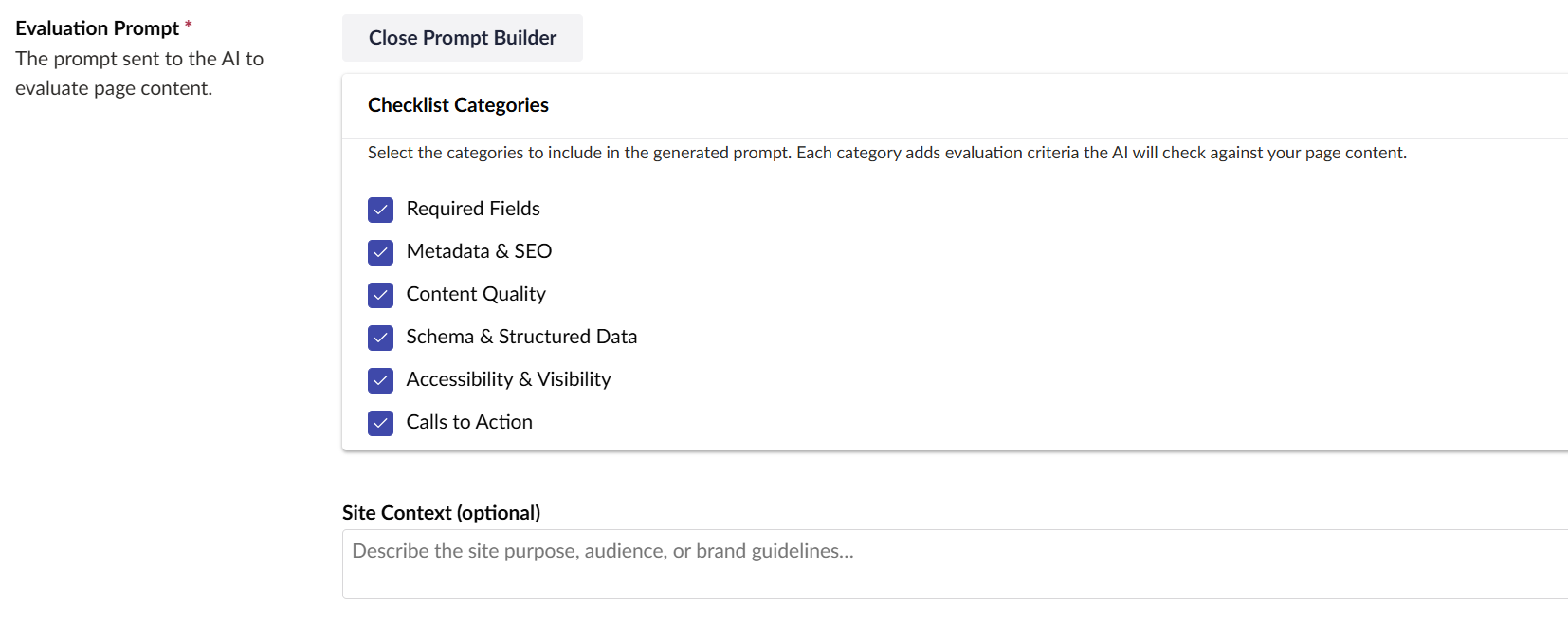
- Paste in the prompt you would like to use or open the Prompt Builder to help guide you on building a prompt.
- Be sure to Enable Scoring if there are scoring values that will be a part of the prompt.

Test it Out
Go to the Content section. Find a page that is of the document type that you specified in the configuration. Press the Evaluate Page button in the bottom right area of the back-office.

Page properties will be sent to AI with your evaluation criteria. An evaluation report will display with recommendations, a list of items to review, and scoring (if enabled).
The results are cached so that AI doesn't have to run each time you want to view the report (save those tokens!). It will re-run the report if the page has been saved since either the last run or if the evaluation criteria has been updated..
Key Takeaways
- Content clarity is now a competitive factor and AI systems interpret your pages before many visitors do.
- ProWorks Umbraco.AI Page Evaluator brings structured, content quality feedback directly into the Umbraco editor.
- It's open source, built by an Umbraco Platinum Partner, and available now on NuGet.
- Better content evaluation upstream means fewer post-launch surprises.
Check it Out!
Try the plugin, open an issue, suggest a feature. It's open source and we want to know how teams are using it.
Need Help?
If you'd like help implementing this as part of a broader content quality initiative, or if you're evaluating an Umbraco upgrade and want content quality to be part of that conversation, we'd love to talk.
Frequently Asked Questions (FAQ)
It works with any AI provider configured in Umbraco.AI, including Anthropic Claude, OpenAI, and others. The plugin is provider-agnostic by design; you select the AI profile when setting up an evaluator configuration, so whichever model your team already has access to will work.
The current release requires Umbraco CMS 17.3.x+, Umbraco.AI 1.8.x+, and .NET 10. If your site is on an earlier version of Umbraco, the plugin is not compatible yet. Support for additional versions may come in future releases.
Yes, it sends page content to whichever AI provider you have configured in Umbraco.AI. Before sending, the plugin cleans the content: HTML tags are stripped and long property values are truncated to reduce token usage. If your organization has data sensitivity requirements, review your AI provider's data handling policies before deploying. You can also use the property filtering feature to exclude specific fields from the evaluation entirely.
Yes. When setting up an evaluator configuration, you can select exactly which document type properties to include in the evaluation. Any properties you do not select are excluded from the AI call. This is useful both for keeping sensitive fields private and for reducing token usage on pages with large amounts of irrelevant content.
Yes, this is one of the plugin's core design principles. Each evaluator configuration uses a custom prompt you write for that specific document type. The Prompt Builder UI can auto-generate a starting prompt from your document type's properties and a set of checklist categories, which you can then edit and refine. You can also attach a Context resource from Umbraco.AI to give the model additional background about your organization or brand.
The plugin itself is free and open source under the MIT license. In addition, your AI provider's API charges based on token usage. For most sites running on-demand evaluations, API costs are minimal.
The plugin evaluates individual pages on demand inside your Umbraco back office, using prompts you configure. It is a self-serve tool built for ongoing editorial quality control your team can run as part of a regular publishing workflow.
ProWorks' site-wide AI Content Evaluation service is a done-for-you engagement that analyzes how AI systems interpret your entire organization across all public content. It delivers an AI Perspective Report covering your inferred positioning, value propositions, audience signals, and content consistency. This plugin is a great starting point; the service is for teams who want the full picture across their whole site.
